
complete reference
Every feature, illustrated.
The full inventory of Neurones 3D, with real renders produced headlessly by the engine itself. No compositing, no mockups. Every number below is measured.


Point Cloud Engine
Open survey-grade files the moment they land on the window, and keep moving at 60 fps whatever their size. The out-of-core index means the limit is your disk, not your RAM: billion-point-class files run on ordinary laptops.


- LAS: memory-mapped parallel reader, 43.5M points parsed in ~1.2 s; automatic 8-bit vs 16-bit RGB detection; intensity and classification carried as scalar fields
- LAZ: parallel decompression at ~40M points/s (142M-point files in ~3.3 s); COPC supported; serial fallback for exotic chunkings
- E57: multi-scan tripod files with poses applied and scans merged, parallel per-scan reads; embedded photo extraction; 360 panoramas projected into the scene
- PLY point clouds: arbitrary extra properties become colorable scalar fields
- NPY: NumPy arrays (N x 3 or wider, f32/f64), extra columns as scalar fields
- Drag and drop everything; file associations; multi-layer scenes via Shift+drop
- Out-of-core indexing: bounded-memory Morton external sort, ~16 s per 43.5M points at a forced 100 MB RAM budget, roughly flat memory in input size
- Zero-copy instant reopen: the LOD index memory-maps back in ~1 s, the OS page cache is the working set
- VRAM node pool: clouds larger than the GPU budget render through a residency pool (LRU plus hysteresis eviction), coarser detail shows until paged in, never a stall
- Additive octree LOD: best-first, screen-importance-driven refinement with a per-frame point budget
- Cloud-drive safe cache: local cache directory, never writes beside synced sources; size-based staleness survives Drive and OneDrive re-syncs; atomic writes
- Color by RGB, height ramp, normals, or any scalar field (intensity, classification, PLY extras)
- An identity colour per cloud: with more than one loaded, each gets the flat colour the scene list gives it, so which survey you are looking at is never a guess
Gaussian Splatting
Neurones 3D renders real 3D Gaussian Splatting natively, and goes one step further: any point cloud can become photoreal surfels, soft tangent-plane Gaussians that blend into continuous surfaces at full survey scale.
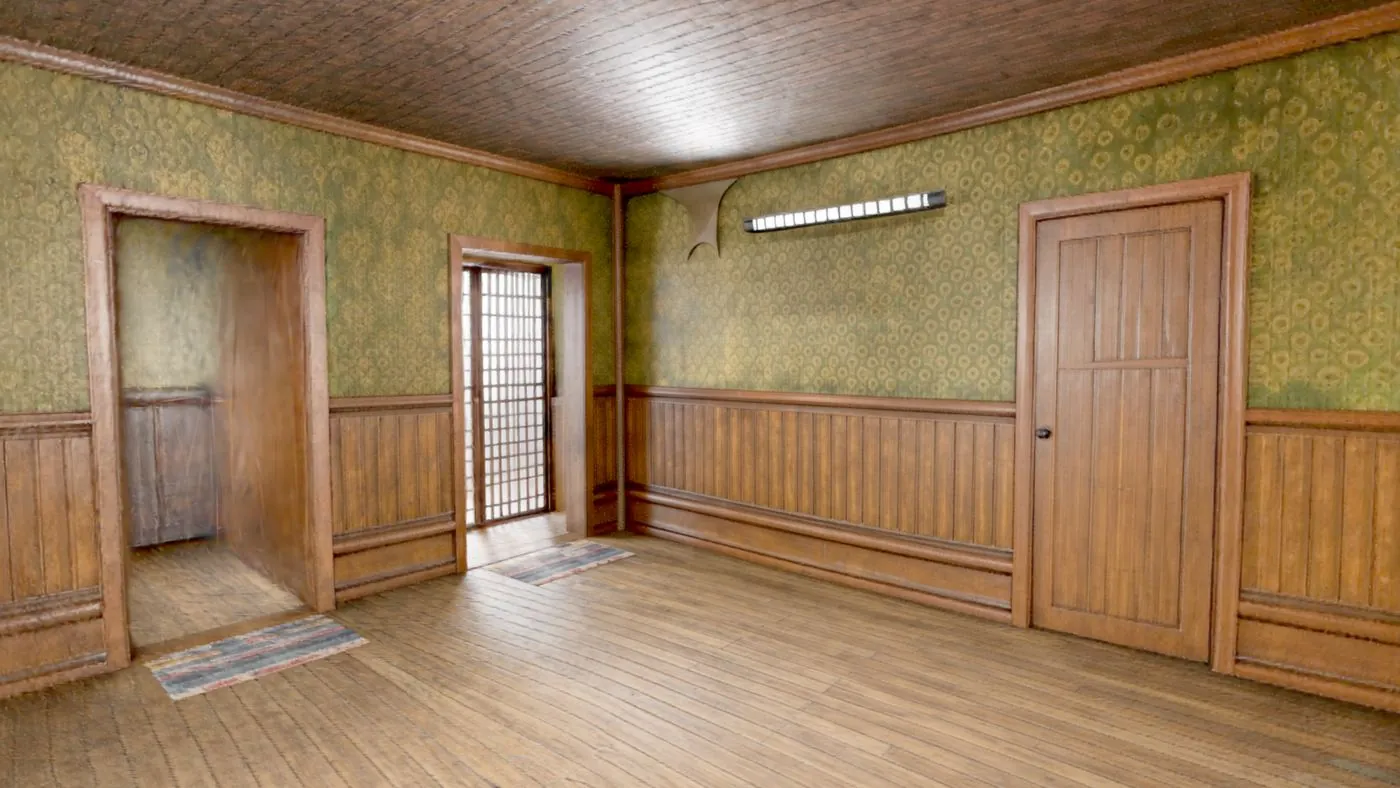


- Formats: PLY gaussian splats (INRIA convention, auto-detected) and SPZ (Niantic)
- Full EWA rasterizer: covariance projection, Mip-Splatting anti-aliasing, premultiplied sorted blending
- Async re-sorting: navigation never blocks on a depth sort; sorting measured 2.6 to 3.9x faster in this release
- Photoreal Gaussian surfels: 2DGS-style tangent-plane geometry with classical sort-free normalized splatting, at full 43.5M-point scale
- Cached normals: per-point normals computed once and reused instantly (measured 5.7x faster on rerun)
- Splats to point cloud export: oriented PLY with normalsPRO
- A level-of-detail tree for splats: a replacement hierarchy, not an additive one — a splat is not a sample of a surface, it is a piece of surface, so coarse levels merge Gaussians and conserve alpha mass instead of thinning
- 2.4x faster at 500,000 splats, 4.6x at 150,000, on a 1.92-million-splat capture, at a quality you cannot pick out in a still
Rendering Engine
The same data can read as crisp survey points, a continuous lit surface, or a field of photoreal surfels, one toggle apart. Every mode runs through a real lighting and post-processing stack, and quality presets fit it to whatever GPU shows up.


- Eye-Dome Lighting: depth-aware silhouettes that make raw points read as geometry
- Surface reconstruction toggle: one key between crisp points and a continuous lit surface
- Hole infill: push-pull filling closes sparse regions; thin structures such as powerline wires stay crisp via a coverage gate
- Oriented surfels: normal-aligned discs for a solid, matte reading of dense scans
- Photoreal Gaussian surfels: sort-free 2DGS-style splatting at full 43.5M-point scale
- Screen-space ambient occlusion + rim lighting on reconstructed surfaces
- SSAA supersampling 1 to 4x with contrast-adaptive sharpening
- 4 mesh shading modes: shaded, albedo, normals, flat
- Quality presets: Eco, Balanced, Premium in one click; integrated GPUs start in Eco automatically
- Compositing: EDL, occlusion-aware distance-faded grid, and gradient backdrop in one pass
Model Engine
One engine for everything that is not a point: USD stages, IFC buildings, STEP parts, glTF assets and PLY meshes, all meshed by pure-Rust importers with no external kernel and no conversion step. A stage out of Omniverse and a building out of Revit take the same path, get the same component tree and the same cache. A 15,217,537-triangle USD stage composes to exactly what OpenUSD itself reports, and every reopen takes 1.6 s.


USD, composed


A .usd file usually contains no geometry at all. It is a description that has to be evaluated: references to other layers, payloads, variant sets, prototypes and instances. Opening one means running that composition, not parsing a mesh.
- USD stages:
.usd,.usda,.usdcand.usdz, read by a native-Rust implementation — nopxrbuild, no FFI, nothing extra in the installer - Full composition: references, payloads, sublayers and variant sets resolved;
classprototypes correctly treated as templates and left undrawn; native instancing expanded - Verified against OpenUSD 26.8: on a 38-layer factory export, the same 65,654 meshes, the same 15,217,537 triangles, and a bounding box agreeing to the millimetre
- Units and orientation honoured:
metersPerUnitandupAxis, including the assembly case where the root layer declares neither and every referenced layer does - Reopens in 1.6 s: composing a 900,000-prim stage takes 59 s once; a
.n3dmeshsidecar means it is never paid twice - Damaged files are refused, not fatal: a truncated or corrupted stage is rejected before anything allocates from a count inside it
Components, and reaching into a model
- A model arrives in named components: the Scene panel gets a tree, grouped by the model's own paths, with an eye on every component and every group
- Hiding one costs nothing: a component is a range of the one index buffer, so hiding it is a draw call not made, not a buffer rebuilt
- Double-click to fly to a component: a triangle raycast, over the visible components only, so hiding a wall to reach the pipe behind it reaches the pipe
- Framed like a point cloud: on the median and the 98th percentile, so one stray vertex half a kilometre out cannot decide where the camera goes
- Headless too:
--list-partsprints the component table,--hide-partthrows the same switch the panel does
BIM, CAD and meshes
- Pure-Rust IFC importer: ISO 10303-21 step-file parser, IFC2x3 and IFC4 schemas, no external dependencies
- 100,871 entities in ~1 s: the pictured 3,956-element building meshes in about one second
- Real solid modeling: extruded solids, faceted breps, mapped instances, true half-space boolean clipping
- Real surface styles: curtain-wall glass and mullions keep their IFC materials; an architectural palette covers unstyled elements
- Millimetre units handled: files authored in mm land at the right size in the scene
- STEP / STP import (CAD): exact B-rep lifted and tessellated by a pure-Rust kernel, size-relative tolerance for crisp curves
- glTF / GLB import: base-color textures, per-vertex colors, normals computed when omitted
- PLY meshes: binary little and big endian plus ASCII; quads fan-triangulated; smooth normals computed when absent
- 4 shading modes: shaded, albedo, normals, flat, with a view-dependent headlight so form reads from every angle
- Per-segment meshing: segmented point clouds become clean planar panels
- A model dropped on a scan is drawn as a model, and keeps its triangles so deviation is measured to the surface itself
- Export as glTF (GLB) or USD stagePRO
- Drag and drop, like every other format; models composite with point clouds and splats in one scene
Voxel Engine
One click turns any scan into a lit block world, in real time, at resolutions up to 2048 cells per axis. Useful for massing studies, game assets, and the occasional Minecraft version of your building.

Walk into the blocks


Any cloud, any scale


- Real-time voxelization of any loaded point cloud
- The blocks take the cloud's current colouring: RGB, a class, a segment or any scalar field, so a classified survey voxelises into classified blocks
- Up to 2048³ resolution, adjustable live
- Minecraft view: lit, blocky rendering with the scan's own colors
- Voxel grid export as glTF (GLB) for game engines and DCC toolsPRO
3D Reconstruction DEV PREVIEW
Drop a phone video on the window and get a colored 3D point cloud back in about fifteen seconds. Feed-forward neural reconstruction, running locally on your GPU: no upload, no account, no cloud minutes.

- Video to point cloud in ~15 s on a warm run
- Feed-forward VGGT reconstruction via ONNX, with CUDA acceleration and DirectML support
- VRAM-adaptive sizing: the model fits itself to your GPU
- Windowed Sim(3) gluing keeps clips up to ~15 min consistent
- Automatic gravity-true orientation: the result stands upright
- Graceful fallbacks when CUDA or the models are absent
Intelligence
Four trained classifiers, parameter-free segmentation, primitive decomposition and a semantic scene graph, all running on your machine with no GPU and no upload. A 43.5-million-point building becomes 1,501 regions a person can actually review, in 5.8 seconds.
Indoors: an office floor, from the inside


Outdoors: a French village from IGN LiDAR HD


- N3D Classifier, Indoor: 10 classes — ceiling, floor, wall, structure, window, door, table, seat, storage, clutter — at 82% held-out per-point accuracy
- N3D Classifier, Outdoor (LiDAR): aerial land cover — ground, low, medium and high vegetation, building, other — at 86% held-out per-point accuracy
- N3D Classifier, Powerlines: ground, vegetation, wire, pylon, for utility corridors, with per-class instancing so individual trees, spans and poles come out separately
- N3D Classifier, Streetscape: 15 classes of mobile-LiDAR street furniture DEV PREVIEW
- It says how sure it was: a random forest votes, so the share of trees that agreed lands as a
confidencecolumn you can colour by and threshold on - The trained models ship in every build, including the free one; nothing here is behind a licence
- Class legend with per-class show, hide, and isolation
- Unsupervised segmentation: self-adaptive and parameter-free, with a fine border-sharp preset
- Per-segment analytics and per-segment meshing to clean planar panels
- Primitive decomposition: horizontal planes, vertical planes, cylinders and clusters — 43.5 M points into 1,501 reviewable regions in 5.8 s, against 9,626 from region growing alone
- Semantic scene graph: objects, typed relations, and the spaces that enclose them — a room found as a volume of air rather than a box, so a table does not wall off the room it stands in
- 31 rooms, 48 openings, 0.35 s on the scan pictured above, with areas and volumes, exported as JSON, GraphML or a descriptor CSV that lands in pandas without a parser
- Robust per-point normals: benchmark-validated pipeline (bilateral PCA, MST plus gravity orientation), cached, powering surfels and the Normals view
- Color by anything: RGB, height, normals, intensity, classification, any scalar field
Terrain and Change
The outdoor half of the Process menu: fit the ground, turn a survey into the raster set a client actually receives, and measure what moved between two of them. A 120 mm settlement found, a 10 mm settlement correctly reported unchanged, against a measured 14.9 mm level of detection — the point being what the tool refuses to claim.
The ground, first


- Cloth-simulation ground filter: no training data, no model file, no domain assumption; the parameters stay live because the way it fails is a shape you can see
- F1 90.3% against a national mapping agency's own labels: an IGN LiDAR HD tile, 16.2 M points, precision 83.8%, recall 97.9%, in 2.14 s
- Two classes and no more:
groundifyand height-above-ground land as scalar columns, exported to LAS as extra bytes and read back by PDAL, laspy and CloudCompare
One fit, one grid, one folder
- Nine products in one pass: DTM, DSM, canopy height, slope, aspect, hillshade, contours, trees and clear-sky sunlight, written together with a
README.txtPRO - They share a grid, and a test says so: exported one at a time, at eight different moments, one of them comes from a different fit and nothing in the files would say so
- Two gradient estimators: Horn by default, Zevenbergen-Thorne on request, and which one produced a map travels with it
- Contours that cannot cross: a fixed saddle rule and canonical edge interpolation, and an interval finer than the data supports is warned, with the finest defensible interval quoted
- It leaves the program: ESRI ASCII Grid and GeoTIFF, opened again in GDAL to check, with a declared no-data sentinel and the northernmost row firstPRO
- Clear-sky irradiation, sunshine hours and sky view, good for comparing one cell against another rather than for predicting a yield, and it says so
What moved
- M3C2 change detection: normal at one scale, a cylinder, the difference of two means — the method surveyors already defend in a reportPRO
- Four verdicts, and one of them is honest: unchanged, gained, lost, and not observed. There is no
Moved, because a moved object genuinely is a gain and a loss - A 95% level of detection per point, with registration error kept outside the square root because a co-registration residual is systematic and does not average away
- Provable on data that ships: the demo pair reports 85.5% unchanged at a 14.9 mm threshold, finds the deep bowl at 26,069 points and correctly leaves the shallow one — which really did move — unchanged
- Carry a column across: project a field from one cloud onto another, 20 M points in 0.21 s; a class id is copied verbatim, never averaged, and an unmatched point returns nothing rather than a confident wrong answer
Toolbox
The deliverables tools: measure with octree-accurate picking, cut plans and sections like a CAD station, and film your data. An 8192 px orthoimage of a floor plan comes straight from the point cloud.


- 2D floor plans and sections: orthographic locked views, rotatable section plane with live 3D slab preview, CAD-style pan and zoom
- Orthoimage export up to 8192 px at full point density, with a progress overlay (PNG/JPEG)PRO
- Measurement: point coordinates plus 3D, horizontal, and vertical distances via octree ray-picking on clouds and splats, triangle raycast on models; double-click to focus
- Flythrough recording: record navigation, replay through a smoothing spline
- MP4 baking: batch-export every render mode at 720p to 1440p, 24 to 60 fps (ffmpeg if present, PNG/GIF fallback)PRO
- Navigation: fly (WASD with a cruise-speed wheel), orbit, pan, dolly
- Save Image at 2x resolution
- Guided tour: gamified first-run walkthrough with auto-completing steps
- Demo scenes: procedural terrain city, powerline corridor, and sculpture mesh
Performance and reliability
Pure Rust on GPU-native wgpu, with a performance culture to match: every optimization is benchmarked against recorded baselines, and a malformed-file torture corpus keeps the engine impossible to crash from data.
The crash test, recorded
One room, four levels of detail


- 60 fps with a 2,000,000,000-point cloud, out of core; 43.5M points measure ~110 fps at 1600x900
- Pure Rust on wgpu: no garbage collector, no runtime pauses, GPU-native from the first line
- Out-of-core by design: bounded-memory indexing and VRAM paging keep 10-year-old laptops interactive on files bigger than their RAM
- Built-in benchmark harness: per-pass GPU timings, frame percentiles, peak memory, recorded baselines
- Measured wins this release: splat sorting 2.6 to 3.9x, surfel normals 5.7x via caching
- Malformed-file corpus: truncated, corrupt, or adversarial LAS, LAZ, PLY, NPY, E57, GLB can no longer crash the app
- 1,222 tests across 78 suites, plus a 17-case automated render QA matrix and a malformed-file corpus that can no longer crash the app
- Crash logging, GPU-OOM self-healing, graceful CUDA and model-absent fallbacks
- Slow formats are decoded once: USD, IFC and STEP have to be evaluated rather than read, so the result is kept in a sidecar and every reopen is a memory-mapped read — 59 s becomes 1.6 s
- The default build links no C at all;
--features fast-allocswaps in a faster allocator for the machines that want it, opt-in and deliberately so
Distribution and licensing
One 15 MB self-contained executable. No installer, no dependencies, no account, no telemetry. The free tier is the whole viewer and every in-app process; Pro unlocks everything that writes results out, with a fully offline key.
- Single 15 MB Windows exe, self-contained, no installer, no dependencies
- macOS: .dmg build pipeline ready
- Free tier: view, import, navigate, and run all in-viewer processing, forever, no trial clock
- Pro tier: data exports (PLY, glTF), MP4 flythroughs, high-fidelity orthoimages
- Offline licensing: an offline license key validated on your machine, no account, no server, any machine
- Version window: one key covers every version released during its window
- License-clean: the whole dependency graph is mechanically verified for commercial distribution
Everything in the viewer.
Every format, the full engine, photoreal rendering, classification, segmentation, sections, measurement. No account. No trial clock.
When results leave the app.
Data exports (PLY, glTF), MP4 flythroughs, 8K orthoimage delivery. Unlocked by an offline license key: no server, no subscription, yours on any machine.